
In the ever-changing world of AI and mobile tech, Grokipedia has quickly become a household name to watch. It was developed through xAI, the company created by Elon Musk. Grokipedia is an AI-powered encyclopedia that aims to transform how information is verified, produced, and made accessible.
While Grokipedia is accessible online, Android users can take the experience to the next level by installing an all-screen Progressive Web App (PWA). It allows you to open it from your mobile’s homescreen as if it were a native app. No downloading from Google Play is required.
In this article, we’ll guide you through the Grokipedia Android Installation Guide for Android and then examine the reasons why this encyclopedia is receiving so much attention within the world of digital knowledge.
What is Grokipedia?
Grokipedia is xAI’s AI-driven encyclopedia, created to provide fact-checked, unbiased information. Or at most, that’s what it’s supposed to be. It is based on Wikipedia’s open-source knowledge, but powered by the xAI Grok Model, Grokipedia blends human-edited information and artificial intelligence curation.
In its initial days, Grokipedia reportedly featured over 880,000+ entries covering everything from technology and science to history and culture. What makes it stand out is its xAI integration with the Grok ecosystem. This means it can grow into a living dictionary continuously updated by AI with minimal human input.
How to download Grokipedia as an app on Android
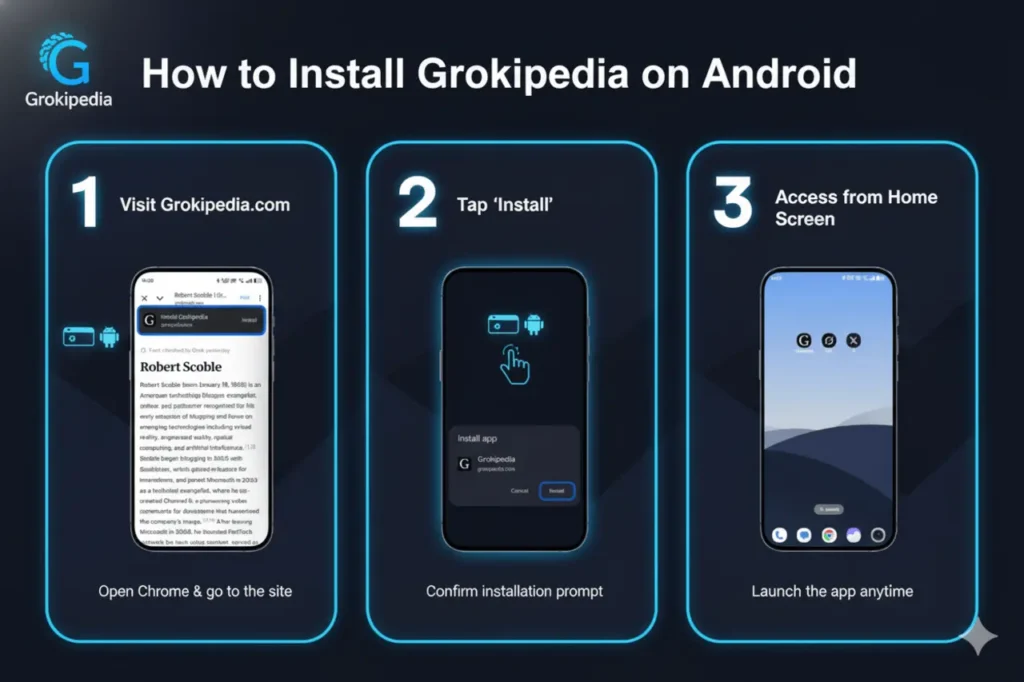
Image Source: Gemini Ai
One of Grokipedia’s most significant advantages is its ability to be installed as an app using Google’s browser technology. Here are the complete steps to follow.
Step 1: Start Chrome on your Android Device
Grokipedia’s app installation is best with Google Chrome. Start Chrome on your smartphone or tablet.
Step 2: Go to Grokipedia’s Official Website. Grokipedia Website
Type https://grokipedia.com into the address bar and hit Enter. The website will take a while to load fully.
Step 3: Search for an “Install” Option or “Add the Home Screen” Option
When the page opens, you may see a pop-up message in the lower right of your screen that suggests you “Install Grokipedia” or “Add to your Home screen.”
If the prompt does not appear immediately, click on the three dots menu () in the upper-right corner of the Chrome screen and choose the option to install the app.
Step 4: Confirm Installation
A small pop-up window will appear asking you to add Grokipedia to your desktop. Select to install, then select for confirmation.
Step 5: Open the App
Now, you’ll see the Grokipedia symbol on the homescreen. Click it, and it’ll open in a separate window that functions just like a traditional Android application. There’s no URL bar, no browser interface — just the encyclopedia.
Why It Functions Like an App – Understanding PWAs
Grokipedia utilizes the progressive Web App (PWA) technology, a cutting-edge web framework that bridges the gap between apps and websites. PWAs let web-based platforms behave like mobile apps, and are also lighter, faster, and simpler to install.
What does this mean for you:
- A no-app store is required: Install directly from Chrome.
- More speedy loading time: Content is cached locally.
- Storage usage is minimal: It takes only a few MBs when compared to traditional applications.
- Automatic updates: It updates automatically when you return to the website.
- Compatibility across devices: Works on Android tablets, desktops, and browsers.
For Grokipedia, the approach makes perfect sense as it allows immediate global access without the hassle of downloading or publishing apps.
Why should you install Grokipedia for Android?
There are a variety of reasons why you should keep Grokipedia close at hand:
1. Instant Knowledge Access
The presence of Grokipedia as your home screen ensures that you can access it quickly anytime you require fast and accurate information that is AI-verified.
2. Clean, distraction-free Interface
In contrast to browsing multiple tabs on the web, the PWA interface allows reading in a specific way.
3. Lightweight and fast
In contrast to the large encyclopedias that use hundreds of MBs, Grokipedia’s PWA requires almost no extra storage space.
4. Always up-to-date
Since Grokipedia updates its database online, you always have access to the most recent version without manual updates.
5. AI-Powered Curation
The encyclopedia uses the xAI Grok method to moderate content and factual verification. The goal is to minimize the spread of false information and ideological biases.
How Grokipedia Differs from Wikipedia
| Feature | Grokipedia | Wikipedia |
|---|---|---|
| Ownership | xAI (Elon Musk) | Wikimedia Foundation |
| Editing Model | AI-assisted, limited community input | Fully community-edited |
| Content Source | AI-generated & curated | Human-written |
| Interface | Modern PWA | Traditional web interface |
| Mobile Access | Installable as app (PWA) | Browser-based / 3rd-party apps |
While Wikipedia has stood as the open encyclopedia standard for two decades, Grokipedia aims to redefine how factual content is produced — using artificial intelligence instead of volunteer editors.
This could speed access to knowledge; however, it raises concerns about transparency, accuracy, and control in the era of AI-generated data.
Advantages of PWA Setup in Knowledge Apps
Grokipedia’s Android installation process aligns with an industry-wide trend. As more platforms embrace PWA technologies and users gain:
- No platform limitations: This avoids the policies or delays of app stores.
- Performance improved: Fast, responsive loading, even on low-end devices.
- Savings on data: less consumption of data as compared with native apps.
- Access to all devices: Compatible with Android mobile devices and browsers.
PWAs such as Grokipedia are especially useful in nations like India, where mobile internet is prevalent and lightweight web applications are the norm.
Possible Challenges and Potential Limitations
The platform cannot be perfect, and the Grokipedia’s initial version (v0.1) has its own growing problems:
- Access to offline content is limited: Cached articles might work, but the full offline mode isn’t available yet.
- AI accuracy issues: Since Grokipedia relies heavily on AI-generated content, users must continue to verify facts with reliable sources.
- A smaller base of articles: Around 900K entries as opposed to Wikipedia’s 7M+.
- Obligation and bias: Some critics argue that algorithms for curation may reflect the nature of the developers and AI in-training data.
Despite these, Grokipedia remains one of the most innovative research projects in technology-based knowledge sharing.
Tips and Considerations for Indian Android Users
- Storage and data: Since this is a PWA, which means it requires smaller amounts of storage compared to a native app, which is good when you are limited on space.
- Speed of network: With Indian cell data becoming inconsistent after loading, you’ll probably enjoy a smoother experience.
- Update handling: The update process differs from that of Play Store apps, which auto-update. PWAs update whenever you return to the Site. Be sure to check back regularly for updates to the content.
- Home screen chaos: If you’re installing several PWAs, the home screen may become crowded. Consider grouping similar icons into folders.
- Trust and reliability: If Grokipedia v0.1 is new and in development, make sure to cross-check facts when you’re using the articles for professional or academic purposes.
- Region and language: The Site supports multiple languages, and its use in India could be heavily contingent on the English version. Make sure your language is currently supported (some are still in development).
Analysis and Implications – Grokipedia Android Installation
Why the Installation Methodology is Important
The truth is that Grokipedia offers a straightforward “install this in your browser” flow, which is essential for two reasons:
- Lower the barrier to entry: It is not necessary to search through an app store, agree to permission to use the app, or wait for approval.
- Expanding the reach of apps similar to websites: This is a good example of how modern websites blur the distinction between apps and websites. PWAs enable major service providers to offer an app-like experience with just a URL.
To Grokipedia in particular, this might aid its growth, reach users in regions where the Play Store may have stricter oversight, and make it the primary “go-to” mobile encyclopedia.
The Reason why Grokipedia’s launch is an Important Event
As a possible alternative to Wikipedia, Grokipedia is entering the core of internet information.
- The increasing accessibility of knowledge means an encyclopedia is essential for education, reference, AI training, and more.
- If Grokipedia produces content or aggregates it differently (via AI rather than crowd editing), it could change how knowledge is curated and consumed.
- The approach to installation based on mobile apps indicates that this isn’t the Site itself but an application.
Risks & Challenges
- Transparency and bias: The critics point out that Grokipedia already shows signs of agenda-driven, right-leaning content.
- Content duplicate: A few Grokipedia articles are similar in content to Wikipedia entries, posing questions regarding copyright or adaptation.
- Quality in comparison: With around 0.9 million pages compared to Wikipedia’s millions, the depth of coverage, as well as citation quality and editorial oversight, are evolving.
- Trust and verification of the user: If users download it as an app, they might think it’s vetted as a popular app. However, the editorial process and content aren’t yet tested at a larger scale.
Relevance to Industry
For developers of mobile apps as well as SEO platforms, web platforms, and mobile professionals, Grokipedia’s installation procedure includes:
- The growing importance of PWA installation for mobile reach.
- How will new platforms be impacted by SEO strategies to create “app-like” websites (e.g., the search visibility for a PWA as opposed to a native app)?
- The importance lies in “knowledge platforms” in AI pipelines. If the encyclopedias are currently feeding AI the pipeline, then controlling one is a strategic move.
Final Thoughts
Installing Grokipedia on Android is simple and lightweight. However, the importance goes far beyond a simple installation. Grokipedia is a new technological frontier in online information that combines AI technology with mobile access.
It’s unclear whether it will really compete with Wikipedia or become an AI innovation; that remains to be determined. However, for the moment, Grokipedia offers a fascinating glimpse into the future of the encyclopedia, which will be a place where information isn’t simply written down, but created and improved through AI.
If you’re interested in trying it, go to Grokipedia.com. Install Grokipedia on your Android device, then discover the future of digital education.
FAQs
1. What exactly is Grokipedia?
Grokipedia is an AI-powered encyclopedia created by xAI, designed to provide quick, accurate, and reliable information online. It also offers bias-free knowledge.
2. Can Grokipedia be downloaded on iPhones?
It currently works on Android via Chrome. iOS supports PWA installation, which may be available in the future.
3. Is the Grokipedia app available for free?
Yes. Installation and use of Grokipedia are absolutely free.
4. Does Grokipedia operate offline?
Some content can be cached; however, offline reading of the full content isn’t yet accessible.