

Imagine this: you’re holding your iPhone and instead of calling on Siri, you press and hold the Action Button, and boom, you’re talking to a powerful AI assistant that not only chats, but also does a real-time web search, crafts complex answers, and works across apps. That’s the promise behind using the Action Button to launch Grok AI, as summed up in a recent tweet. It sounds simple, but what’s really happening here reveals a lot about the state of mobile AI assistants, Apple’s ecosystem, and the changing nature of how we interact with our devices.
In this article I’ll walk you through why Grok AI iPhone shortcut matters, how to set it up, and what it means for the wider picture—especially the gap between what Siri offers and what a capable assistant like Grok can deliver.
Context & Background: The Rise of Grok AI and Apple’s Assistant Gap
1. Grok AI’s arrival
The AI assistant Grok is developed by xAI (which is backed by Elon Musk) and defines itself as “maximally truthful, useful and curious.” In January 2025, the standalone Grok iOS app launched in the US (and also other select regions such as India), thereby opening up use beyond the integration inside the social app X. Grok offers real-time web search, image and video generation, voice mode, and full-scale assistant functionality.
2. The iPhone Action Button
With newer iPhones (such as the iPhone Pro models in recent generations) Apple introduced an “Action Button” which the user can customise to launch a variety of shortcuts or actions. The tweet outlines how you can map the Action Button to a “Talk to Grok” shortcut—thereby converting a hardware press into instant AI access.
3. The Siri conundrum
Siri, Apple’s built-in assistant, has long lagged behind some competitors in terms of conversational ability, real-time web search, and third-party assistant support. The tweet suggests that Siri “doesn’t have any real assistant capabilities. It can’t answer basic questions, struggles with simple tasks, and is seriously limited.” Whether you agree with that statement in full, it highlights a sentiment: many users feel Siri falls short of being a true intelligent assistant compared to newer players like Grok.
4. Why this matters now
In a context where generative AI and advanced assistants are gaining traction, being able to quickly access a powerful assistant on your phone is a big deal. Customising the Action Button to launch Grok isn’t just a neat hack—it’s symptomatic of user demand for more capable interactions and Apple’s ecosystem tensions (with third-party assistants, control, and user expectations).
Key Insights & Arguments
1. Quick access equals higher usage
By mapping the Action Button to Grok, you reduce friction: no need to open the app, type a query, or navigate menus. One press, and you’re interacting with an assistant. This convenience is crucial. Research into technology usage consistently shows that lower friction (fewer barriers) leads to higher adoption. If a user already has to go through steps to reach Siri or open an app, they may default to something simpler (search, ask a friend, etc.). The shortcut removes that barrier.
2. Grok’s real-time search and multi-modal capability
Grok brings in real-time web search, image and video generation, and voice mode—features that equip it to operate more like a “true assistant”. Apple+1 The tweet emphasises this: “answers in real-time, and does a quick web search when needed automatically, without needing to do anything”. This differentiates Grok from many basic assistants in tablets/phones which are more scripted.
3. Apple’s regulation of third-party assistants
The tweet notes: “Apple still restricts third-party voice assistants, even though it can’t offer what they can.” Indeed, in the iOS ecosystem, third-party voice assistants have limited system integration compared to Siri (e.g., system-wide hotwords, deep OS hooks, hardware button mapping). That makes the Action Button hack somewhat of a workaround rather than a full system-level integration. From a strategic point of view, it shows how users are finding workarounds and pushing the boundaries of Apple’s system limitations.
4. The practicality of the setup
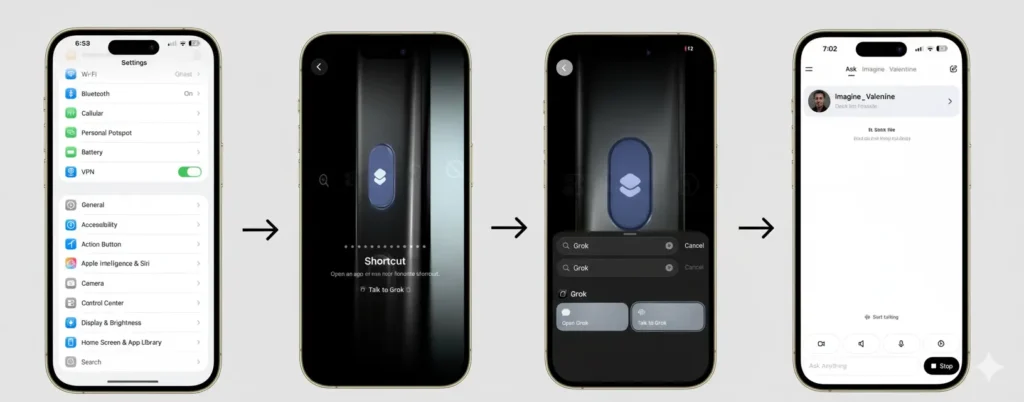
Here’s how the tweet explains the setup:
- Open Settings
- Tap on Action Button
- Swipe to select Shortcut
- Tap to choose a shortcut
- Search for the Grok App
- Select “Talk to Grok” as your action
- DONE
Now pressing and holding the Action Button gives you “Instant Grok Access” even from the Lock Screen or any app.
That kind of practical step-by-step shows how accessible the workaround is for many users, and how such customisation empowers them.
5. User expectations of assistants are growing
Users expect more: voice interactions, web-aware answers, multi-modal inputs and outputs (images, video), cross-app context, personalisation. If a built-in assistant doesn’t deliver, users will look for alternatives and creative approaches (like this one). The trade-off here: How much of a seamless experience do you get, and what are the compromises (privacy, integration, reliability)?
Counterpoints & Critical Analysis
1. Integration vs. workaround
While mapping the Action Button to Grok works, it remains a workaround rather than full system integration. For example, Siri is embedded deep in iOS, can be triggered hands-free, can control system features (alarms, settings) and is built by Apple with privacy/access advantages. A third-party assistant, even with a button shortcut, may have limitations (e.g., not controlling system settings, less voice-hotword support, etc.).
2. Privacy and data concerns
Third-party assistants bring questions about data access, privacy, permissions, and trust. The user is relying on an app (Grok) from xAI: how does it treat data, cross-app access, voice inputs? Apple tends to position Siri as more privacy-safe (though opinions vary). The tweet doesn’t delve into this trade-off.
3. Reliance on button hardware and OS version
The Action Button is not available on all iPhones—only certain models. So this workaround excludes many users. Also, Apple could change OS behaviour or restrictions that make such shortcuts less robust in future updates.
4. Performance and reliability
While Grok claims strong performance (and recent upgrades show impressive benchmark gains). It has also drawn controversy around misbehaviour (e.g., instances of offensive outputs), which raises questions about reliability and safety. A user relying on it for everyday assistant tasks may need to keep that in mind.
Ecosystem dependence
Mapping button to Grok still depends on the Grok app being maintained, available in region, and button-shortcut mapping staying supported. If Apple or xAI change policies, things might break. In contrast, the built-in assistant tends to have longer support continuity.
What This Means for Users and Developers
For users
- If you have an iPhone with an Action Button (and run a compatible iOS version), mapping it to Grok is a tight productivity win.
- It gives an alternative to Siri—especially for users frustrated by its limitations.
- But assess privacy settings, app permissions, and region availability.
- In time, keep an eye on how Apple evolves its assistant and shortcut support (the workaround may become obsolete or less seamless).
For developers & ecosystem watchers
- This workaround is a signal: users want “one-tap assistant access” that is powerful.
- Apple’s restrictions on third-party assistants may increasingly be seen as friction in the face of an AI-driven device experience.
- The success of shortcuts like this may push Apple to evolve how it allows third-party assistants (or develop Siri further to stay competitive).
- For AI-assistant developers, iOS user customisation (buttons, shortcuts) is an avenue to enhance adoption—but also presents platform risk (updates, policy changes, OS restrictions).
Sub-themes & Related Developments
- Benchmark arms-race in AI assistants: The latest version of Grok (Grok 4) claims high performance on benchmarks and multi-modal capabilities. iPhone Action Button Grok
- Third-party assistant integration in mobile OSes: How iOS compares with Android in allowing alternate assistants, voice triggers, and deep shortcuts.
- Privacy vs. convenience trade-off in assistant apps: As more powerful assistants access more data and apps, how do users balance convenience with security?
- User customisation trend: Buttons, gestures, shortcuts—users want more control over their device workflows, beyond what OEMs supply.
- The future of voice/hardware interfaces: With devices adding more physical controls, voice is still dominant—but hardware shortcuts like an Action Button may become more strategic.
- Apple’s strategic position: As the mobile AI assistant landscape expands, how will Apple respond? Will it open more access (for assistants like Grok) or improve Siri to stay ahead?
Final Thoguhts
The original tweet isn’t just a how-to for mapping your iPhone’s Action Button to launch Grok AI. It’s a microcosm of larger forces at play: the rise of powerful AI assistants, user dissatisfaction with legacy assistants like Siri, and the creative workarounds that users adopt within the constraints of Apple’s ecosystem.
By enabling “Press & Hold Action Button = Instant Grok Access,” the user gets a streamlined gateway to an AI assistant that claims to deliver far more than a simple voice command system. But with that convenience come considerations—privacy, integration, reliability, and dependence on a hack rather than a built-in path.
If Apple wants to remain competitive in the assistant war, it may need to rethink how it allows integration with third-party assistants, or dramatically improve Siri itself. Meanwhile, users who want more from their iPhone assistants could benefit from this setup—but should do so with awareness of the trade-offs.
In the end, the tweet’s key message matters: You don’t have to wait for Apple to fully evolve Siri or third-party access. You can make a smarter assistant your go-to, now, with one simple button press. And that simple fact carries much significance.
FAQs: Grok AI iPhone Shortcut
1. What is the Grok AI iPhone shortcut?
The Grok AI iPhone shortcut lets you use your iPhone’s Action Button to instantly access Grok AI, a powerful assistant that can answer questions, perform web searches, and provide multi-modal responses in real-time.
2. How do I set up the Grok AI iPhone shortcut?
Go to Settings → Action Button → Shortcut → Choose Shortcut → Search for Grok App → Select “Talk to Grok”. Now pressing and holding the Action Button gives instant access to Grok.
3. Can I use the Grok AI iPhone shortcut from the Lock Screen?
Yes, once set up, you can trigger Grok AI directly from the Lock Screen or any app using the Action Button.
4. How is Grok AI different from Siri?
Unlike Siri, Grok AI can answer complex questions, perform real-time web searches, generate content, and offer multi-modal responses, making it a more capable AI assistant.
5. Are there any privacy concerns with using Grok AI on iPhone?
Using Grok AI involves sharing data with the app, so users should review app permissions and privacy settings to understand how their information is handled.
6. Which iPhones support the Action Button for this shortcut?
The Action Button is available only on certain iPhone Pro models that support hardware customisation for shortcuts. Older iPhones do not have this feature.
7. Can Apple restrict the Grok AI shortcut in the future?
Yes, since this is a third-party app using a shortcut workaround, Apple could change iOS restrictions, which may affect the functionality in future updates.
8. Is Grok AI free to use on iPhone?
Grok AI offers free and subscription-based tiers. Some advanced features, like extended usage and multi-modal capabilities, may require a paid subscription.