
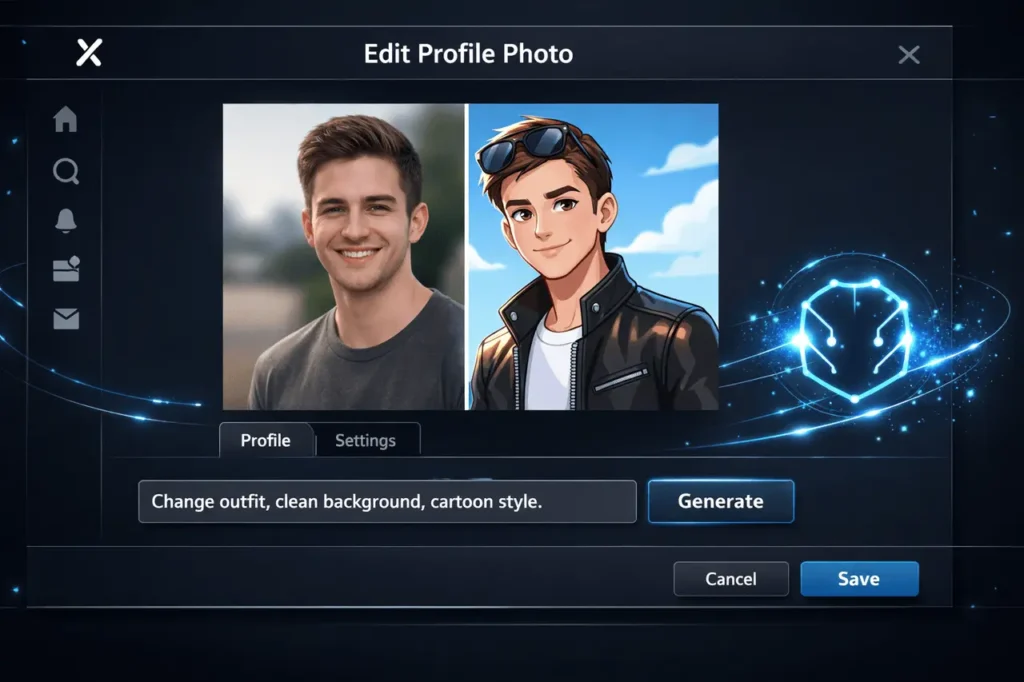
Profile photos have become an essential part of online identity, particularly on social networks, where a single image defines you as a person. Recently, X introduced a new AI-powered feature that lets users change their profile picture directly on their profile page with Grok. Instead of importing a new image or using other editing software, users can now alter their profile image with a simple text prompt.
This update is an essential step towards introducing the power of generative AI into daily routine social media processes. From changing your outfit and applying makeup to making yourself look like an animated character or changing the background, Grok makes profile image modification easy, flexible, and accessible.
This article explains Edit X profile image with Grok, how the feature works, how to use it, why it is essential, and how to achieve the most efficient results.
ntial, and how to achieve the most efficient results.
What is Grok?
Grok is an artificial intelligence-based assistant created in collaboration with xAI and designed to integrate into X seamlessly. It combines conversational AI with real-time platform understanding, allowing users to write text, analyse content, and edit or create images directly within X.
In contrast to traditional AI chatbots, which operate as standalone tools, Grok is deeply integrated into the X ecosystem. This lets it understand the platform’s context and perform actions such as editing profile pictures without the need for third-party applications.
Key Capabilities of Grok
- Conversational AI responds to natural language queries simply. It is direct.
- Real-Time Alert: Can reference current developments and other public content on the web.
- Editing and Generation of Images: Enables users to edit or create images by using text prompts
- Customising your Profile: Powers features like AI-powered profile image editing directly from the profile.
What is Grok Profile Image Editing on X?
Grok profile editing is an integrated AI feature that lets users edit their profile picture without leaving the X platform. It uses text prompts – short natural-language instructions to generate edits to the existing image.
In contrast to traditional photo editing software that requires users to make adjustments manually or have design expertise, Grok interprets descriptive prompts and applies visual changes instantly. It is intended to be conversational, swift, and easy, which is a natural fit for how users already use AI in X.
The primary characteristics of the feature are:
- Direct access to your profile page
- Prompt-based editing of images (no sliders, layers or even layers)
- Fast generation times
- Multiple creative styles supported
What You Can Customise With Grok?
Grok’s editing tools are focused on the individual’s appearance and design. Although it’s not a complete replacement for professional photo editing software, it can handle the most common profile-image use cases exceptionally well.
Outfit and Clothing Changes
You can change the outfit in your profile photo by writing what you’re looking for in your outfit. Examples include formal, casual, and seasonal attire, as well as themed outfits. This is particularly useful when your image is old or does not reflect the current fashion.
Makeup and Styling
Grok allows subtle or dramatic makeup changes depending on your prompt. You can request natural, professional, or stylised enhancements suitable for profiles with avatars or creative designs.
Cartoon and Stylised Avatars
The most well-known application is to transform a photo into a cartoon-illustrated avatar. It is possible to specify different styles, such as anime-inspired, comic, or minimal illustrations, making it easy to create a unique profile image without commissioning artwork.
Background Changes
If the photo you originally uploaded is cluttered or has a boring background, Grok could replace it with a cleaner, more thematic background. The most popular requests are solid background colours, studio-style outdoor scenes, park scenes, or abstract images.
Overall Aesthetic Adjustments
Customers can also request editing based on style or mood, such as an edgy look, a professional headshot experience, or imaginative lighting effects.
How to Edit Your Profile Image Using Grok?
The procedure is designed to be easy and is intended for non-technical users.
- Visit the profile section on the X
- Choose the option to modify your profile picture
- Select Grok as the editor tool
- Enter a text prompt describing your desired changes
- Examine the image generated and verify or modify
You can repeat the process by changing your prompt if the initial result isn’t what you’d like. This loop of refinement and prompts can be one of Grok’s strengths. Permitting incremental improvements without having to start over.
Writing Effective Prompts for Better Results
The quality of your output will depend on the clarity with which you express the results you desire. While Grok does well with simple prompts, more precise instructions generally yield better results.
Tips for Better Prompts
- Be precise and concise, but be succinct
- Mention mood, style and even context if pertinent
- Beware of conflicting instructions within one prompt
- Select whether you would like real instead of stylised results
For instance, instead of saying “change my look,” the prompt should be clearer and explain the attire, background, and style you’re aiming for.
Why This Feature Matters?
Simplifies Personal Branding
Profile pictures are often the first thing people look at. By making AI editing an integral part of the platform, X reduces barriers to maintaining a polished, consistent online appearance.
Reduces Reliance on Third-Party Tools
In the past, users were forced to rely on designers or third-party apps for even minor changes. Grok incorporates these capabilities into the platform, thereby saving time.
Encourages Creative Expression
By enabling animated cartoons, stylised avatars, and aesthetic experiments, the feature lets users express their personality and creativity more easily.
Demonstrates Practical AI Integration
Instead of abstract AI features, the new update illustrates how generative models can address everyday user issues simply.
Edit X profile image with Grok: Limitations and Things to Keep in Mind
While it’s powerful, it does have limitations:
- Results are contingent on the clarity and quality of the image
- Highly complex edits may require multiple prompt iterations
- The tool is designed for profiles, not for complete photo manipulation.
- The availability may depend on the account type or the regional rollout.
Recognising these restrictions can help create realistic expectations, which leads to better results.
Best Use Cases for Grok Profile Image Editing
- Making your profile photos up-to-date without having to take new photos
- Create an avatar that is professional or themed
- Maintaining visual consistency across platforms
- Exploring different creative styles before you commit to one
For professionals, creators, and casual users alike, this feature allows them to refresh their online profiles quickly.
My Final Thoughts
The ability to edit your profile picture on X using Grok marks a significant shift in how social platforms utilise AI. By combining generative editing with an intuitive prompt-based interface, X lets you personalise your profile simply, faster, and more easily than ever before.
As AI tools continue to be integrated directly into our daily digital lives, features such as this provide a clear, practical, user-centric, and empowering path. If you’re looking to change or redesign their profile, Grok offers a compelling new feature built into the application.
Frequently Asked Questions (FAQs)
1. Do I require design expertise to modify my profile picture using Grok?
No. The feature is entirely based on prompts, and you’ll only have to express what you need in plain English.
2. Can I change my profile picture from the beginning?
Yes. You can save the original picture or change it at any point in your profile’s settings.
3. Can cartoon-style and avatar style be supported?
Yes. Grok supports various stylised outputs, such as animated and cartoon-like avatars.
4. Can Grok take over professional photo-editing software?
It’s not perfect, however. It’s intended for quick, practical edits to profile images rather than advanced multi-layer editing.
5. Can I recreate an image?
You can repeat the process several times to refine your prompt; however, the limits may depend on the type of account or usage guidelines.
6. Does this feature appear on the profile page?
Yes. Editing options are accessible directly from the X profile, making the process easy and fast.
Also Read –