
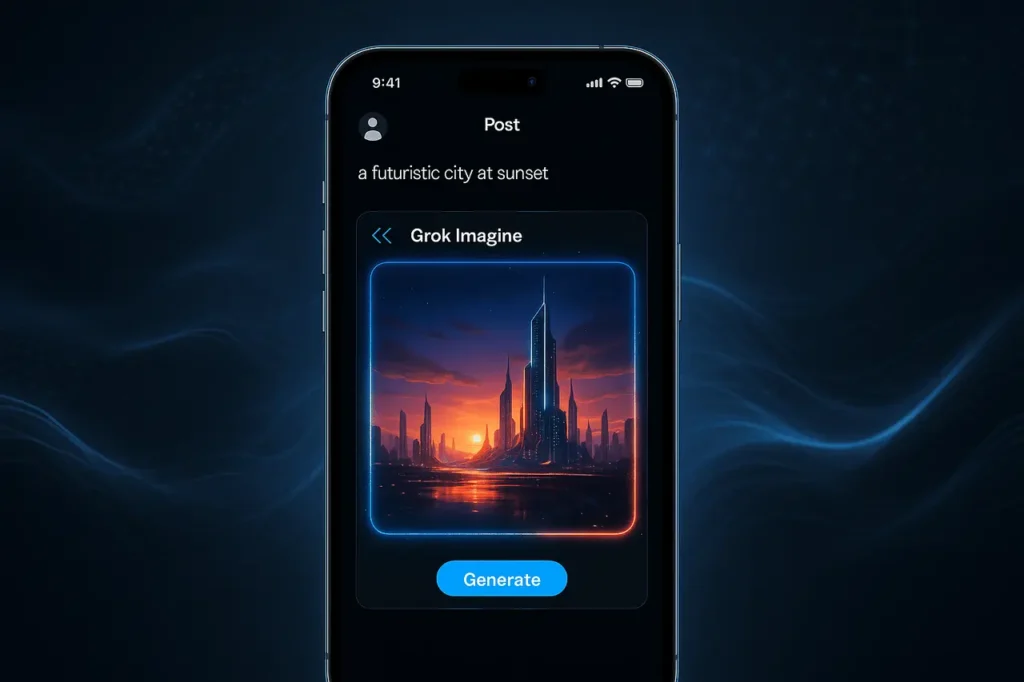
The launch of Grok Imagine in the X iOS post editor marks an essential shift in how users can create and share images and videos in the app. Instead of relying on design tools from outside or standalone AI-generation applications, users can now create videos and images in the same way as they write an article. This integration simplifies content creation and positions X as a quick, easy multimedia creation application accessible to a large user base.
As AI-generated graphics continue to gain prominence across social media, Grok Imagine’s place at the forefront of the post-posting experience underscores the growing importance of quick, creative, algorithm-powered innovation.
What is Grok Imagine?
Grok Imagine is a generative AI tool from xAI, the company behind Grok, that lets users make videos and images with AI prompts. The tool was initially launched in 2025 as Grok’s capabilities grew. Imagine generates visuals from text and can even turn existing images into video clips. In addition to producing still pictures, Grok Imagine supports:
- Text-to-image Generation: Provide an informative prompt, and you will receive a realistic or stylised image within seconds.
- Image-to-video Transformation: Upload a still image (or create one), and the program will transform it into a video with motion and, occasionally, audio.
- Short video Generation in the Movie Mode: Imagine creates clips typically about six seconds long, suitable for sharing on social media.
The emphasis is on speedy, accessible content creation for fun or casual use, experiments, social media, or even marketing images.
What does the new integration do: Grok Imagine Directly in X iOS Composer?
Recently, Grok Imagine was integrated directly into the post editor for X (on iOS), so users can now create or draw animations straight from writing a post.
This integration simplifies the creation of content using X Users:
- You don’t have to manage apps or other tools. You can write and publish all in one location.
- Reducing any friction for amateur creators who might want to create quick images without the technical hassle.
- It makes it easier for influencers, marketers, and brands to create captivating multimedia posts quickly.
The change signals that xAI plans to use Grok Imagine not just as a standalone novelty, but as an integrated core feature for creating content for everyday use on X.
What Does This Mean: Use Cases and What They Can Do?
Social-media creators and private users
With Imagine in the X composer, the user can quickly transform any idea into a shared image or short video, whether it’s a stylised image, a background for social posts, or an instant animated image. It removes the barrier to creative posting.
Branding and marketing content
Small businesses, startups, or individuals with their own brands can now make eye-catching videos (banners, promotional posts, animated announcements) more easily and at a lower cost, without needing graphic design tools or other video editing software.
Communicators, educators, and storytellers
People who explain ideas, such as in tutorials, threads, or even storytelling, may enhance their texts by using custom graphics, which increase engagement, readability, and sharing.
Experimentation & creative expression
Due to its speed and versatility (ranging from the stylised arts to photorealism), Imagine can become an open-ended playground for creativity, including art-inspired experiments, short animated videos, stylised images, and more.
How Does It Compare to Similar AI Interactive Tools
Grok Imagine can be a component of a wider set of creative AI tools for visuals, but there are a few distinct features that make it stand out:
- Speed: According to some studies, Grok Imagine produces visuals faster, with some instances taking up to 1/4 as long as similar tools to create a single high-quality image.
- Accessibility: As it’s integrated into X (and Grok and the Grok application), it doesn’t require you to sign up for separate services or join other platforms. Even users who aren’t paying for it can use it (though with limitations).
- Flexibility: It is compatible with both image-to-text and text-to-image workflows, offering greater creativity than tools limited to static images.
As with other AI tools, this is in beta or an early stage. Outputs may vary in quality depending on the user prompting them, and specific options (especially video) may be restricted based on the user’s subscription or location.
What You Need to Learn Before You Use It?
- Prompting is still Necessary: The style and quality of the image or video generated depend significantly on how you define your idea: clarity, details, mood, design, and style all impact the final result.
- Limitations and Beta Versions: Grok Imagine is still relatively new. Video generation and video image transformation are new features that could be restricted for specific users.
- Moderation and style issues: With many AI art tools, output style can be unpredictable. There are stories that older versions of the program included permissive rules for content generation.
- Limits on Subscriptions for Potential Subscribers: While the basic access option is available, more advanced usage (or a higher quota limit) may require a paid plan or rely on users’ X/Grok subscription tiers.
The Bigger Image: The Reasons xAI is banking on AI-Visuals Social Media
By integrating Grok Imagine directly into X’s post-composing tool, the company is strategically betting that generative AI will become an integral, not supplementary, component of the content-creation process. Instead of relying on specific design tools or software, users can create visuals in real time, lowering the barrier to access.
This could speed up the process by which social media content is no longer limited to images and text, as it is now, but to AI-generated images (illustrations, animations, and videos). In the case of xAI and X, this allows them to stand out from other platforms and creates an innovative ecosystem that is fully integrated with post-production, prompting, generating, and publishing.
If successful, this integration may change how content is created on social media, increasing the accessibility of visuals, reducing dependence on professional tools, and incentivising more interactive, multimedia-focused posts.
Final Thoughts
The arrival of Grok Imagine in the X iOS composer demonstrates how quickly generative AI is becoming a core part of social media communication. By allowing users to create images, animate photos, and generate short videos without leaving the posting interface, X and xAI are lowering the barrier for high-impact, visual-first content.
While the feature is still in development, its integration hints at a future in which AI-generated media becomes the norm in online expression. For creators, brands, and everyday users, this update makes visual storytelling faster, more intuitive, and more accessible than ever.
Frequently asked questions
1. Do I require an extra app to run Grok Imagine on X iOS?
It’s not. As Imagine is directly integrated with the X post editor on iOS, you can create videos or images while creating your post without switching apps.
2. Can I make any photo animated with Grok Imagine?
Yes, the user can submit a picture (or use a generated one), or Grok Imagine can transform it into a brief video clip, with optional audio and motion.
3. Is Grok Imagine available for unrestricted use?
Basic usage, particularly for image creation, appears to be completely free, though there may be usage limitations. For heavy commercial or commercial users, a higher-tier subscription may be required, depending on the xAI/X plan.
4. Are the video clips long? Created through Grok Imagine?
The videos generated are usually very short, about 6 seconds, which is why they are ideal for short social media posts or looping clips.
5. What is the best way to compare Grok Imagine to the other AI Image/Video Generators?
Grok Imagine is often faster and easier to access (since it’s part of X). It can support both text-to-image and video-to-image workflows, making it flexible. As a relatively new tool, its outputs may appear less professional than those of other specialisation platforms, depending on the prompt and context.
6. Are there any moderation or content issues when making use of Grok Imagine?
As with many generative AI tools, moderation is an issue; earlier reports have revealed that specific versions of Grok Imagine allowed permissive content creation. Users must comply with their content policy when generating or publishing AI-generated images.
Also Read –
Grok Imagine Text to Video: xAI Launches 10 Second AI Video Generator
Grok Imagine: The Next-Level AI Tool Rivaling Midjourney in Creativity and Speed
Grok Imagine Remix Feature: Animate Your Own Images into Videos