
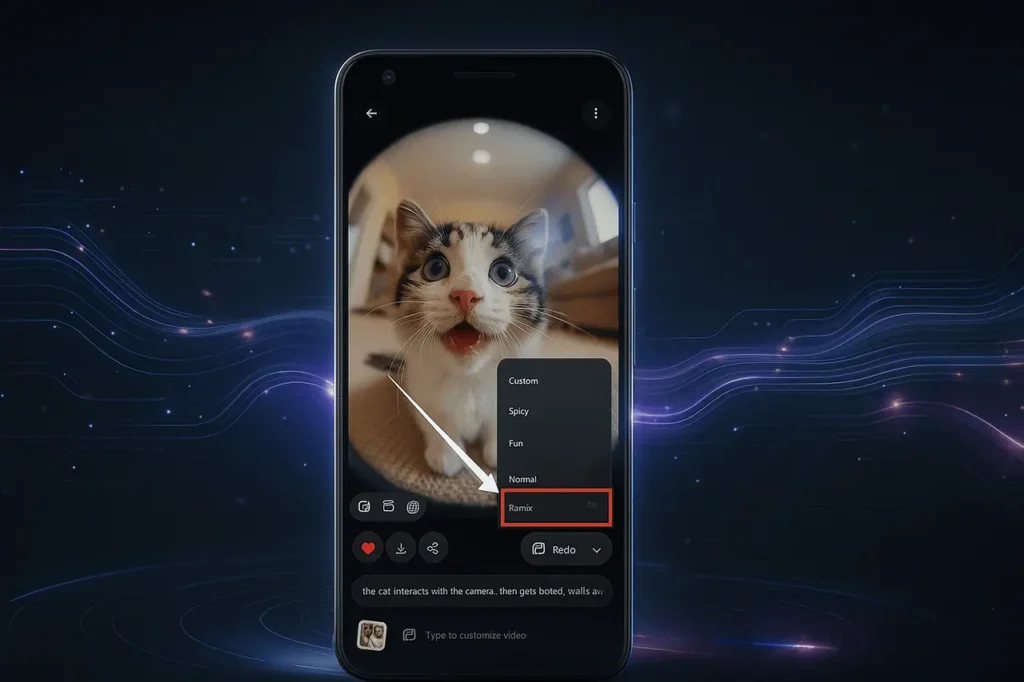
Grok Imagine is an AI-powered video and image generation tool of xAI (founded by Elon Musk). It has recently received a significant update on Android, with a Remix feature that lets users upload their own photos and turn them into a video. This is a substantial improvement in the tool’s capabilities and makes Grok Imagine more competitive in the short-form video and AI-powered content creation market.
Here’s a comprehensive breakdown of what the new update is, as well as the reasons why it’s important and how to make use of it, its implications for brands and creators, as well as a list of frequently requested questions at the end.
What is Grok imagine?
Grok Imagine is an AI-powered tool for creating videos and images created for xAI (Elon Musk’s firm). It lets users develop realistic videos and photos by using text-based prompts or uploading images directly to the Grok application available on X (formerly Twitter).
It’s designed to facilitate fast and creative content generation. It’s ideal for marketers, creators, and users on a casual basis who want to create captivating images or animations with no advanced editing tools.
Why This Update Matters
1. From Static to Dynamic
Previously, Grok Imagine allowed users to generate images from text prompts or upload a picture and manipulate it to some degree (text-to-image, image editing), with the addition of the Remix feature that allows users to add their own photos and then create the video using that image, adding motion as well as audio and animation into initially static content. This allows the tool to go beyond only creating images to a richer video format (image-to-video).
2. Mobile-first Creative Tool
The feature that the update is being released for Android first, and iOS “coming soon”, illustrates the mobile-first strategy of Grok Imagine. The creation of short-form videos is largely mobile-oriented (think of TikTok, Instagram Reels, YouTube Shorts). In allowing users to edit their own images into a motion-based video, Grok Imagine is tapping directly into the market for creators and mobile workflows for content.
3. Competitive Positioning
Grok Imagine already competes with AI tools like Sora (by OpenAI) and Veo 3 (by Google) in terms of image-to-text conversion and text-to-video generation. With the possibility of remixing (uploading the image you have created and animating it into a video), the xAI tool has created an industry niche by allowing users to upload content that they have made instead of just text prompts. It could boost the adoption of people who already have pictures (brand assets, product images, or portraits, etc.) and would like to use the pictures creatively.
4. New Use-cases for Brands, Creators, Educators
- Marketers and brands can upload images of their products or pictures, then remix them into engaging short video content, and then use them in social media ads or for campaigns.
- Creators and influencers can animate their own images (travel photographs, shots) into short videos.
- Educators might take a diagram or chart, remix it into a short video clip for a lesson or explainer.
- Because the upload-your-own-image step has been added, the barrier to entry for animation is dramatically lowered.
5. Signals Evolving Monetisation & User Base Growth
In earlier reports, it was noted that Grok Imagine usage was growing quickly (e.g., 10s of millions of images generated) in addition to the fact that xAI was already exploring the possibility of monetisation by integrating ads and premium levels. The brand-new Remix feature could help improve the engagement of users, retention rates, and spread of content, which are crucial if xAI wants to earn money from subscriptions, advertising, or other enterprise solutions.
How the Remix Feature Works (Android)
This is a step-by-step guide that is based on public information available and logical reasoning:
- Make sure you are running the most recent version of the Grok app for Android.
- Start the app and go through”Imagine,” then “Imagine” tab or the new “Remix” option (depending on UI update release).
- Upload your photo: Choose a picture from the gallery of your device (e.g., your personal image or travel image, brand asset).
- Select animation parameters: You will be offered options like the style (e.g., Normal, Fun Custom), time of the clip, the direction of animation, and even background or audio.
- Note: Grok Imagine already has multiple modes (Normal Fun, Normal Spicy, Custom) for video creation.
- Begin the creation: The model takes your photo and creates the video clip (likely 6- 15 minutes), which animates your static image using audio and motion.
- Preview edit and export/share: View the output, edit it, and make changes (if provided) and download or share it on social networks, messaging apps, and more.
- Coming soon: It will be coming to iOS in the near future. The coming to iOS is expected to arrive quickly. Android users will be the first to get the feature initially; iOS customers should be prepared for the feature to be available in the next release.
Key details:
- The uploaded image serves as the basis for the video.
- The tool can be used to add motion (zoom pan, zoom, animation) and sound effects, which are likely to be audio.
- The duration of the video may differ; the video-capable mode of Grok Imagine created 6 to 15-second video clips.
- The software is designed to speed up and make images in just a few seconds or 10s of seconds.
What This Means for Users
For Casual Users
If you’re looking to play, you can now take your own pictures and turn them into animated videos with minimal effort. In addition, mobile rollouts mean you don’t require desktop software. Expect more entertaining animations that are short and loop across social networks.
For Creators & Influencers
There will be a way to distinguish content without having to use video shoots. Upload an image that is static, which you have already, edit it into a video, then add audio, and then share it. This can reduce time and resource barriers. Also, as Grok Imagine integrates into the chat interface of Grok and Grok Imagine, you can create prompts in a short time.
For Brands & Marketers
It’s a simple tool for creating content that allows you to create animations of images of products, brand imagery, or user-generated content into short-form video to use in social ads, Reels, Stories, etc. It is especially beneficial for smaller groups or individuals with no complete video production capabilities.
For Educators & Communicators
Upload an infographic, diagram, or still image and then animate it into a video, ideal to create microlearning videos, explanation reels, or for interactive content using mobile-first formats.
For xAI / Grok as Platform
The Remix release increases the “stickiness” of the platform. The users are likely to spend more time creating, sharing, and coming back. This also broadens the creativity toolset, assisting Grok Imagine to move beyond novelty images to more dependable video/animation realms.
Potential Challenges & Considerations
- Moderation and misuse risk: As with previous versions that were part of Grok Imagine (e.g., “Spicy Mode” that allowed the use of suggestive images), there are some concerns about pictures that are not uploaded with consent or fake deep-fake animations.
- Quality and real-world effects: Initial reports suggest that even though the image generation process is very efficient, the quality of video generation isn’t up to par with top-of-the-line tools.
- Ethics and IP issues: If people upload images that are copyrighted or animations of celebrities and others without permission, it can cause legal questions.
- A platform-specific rollout: Android users may receive features first, while iOS users might delay, leading to dispersion.
- Privacy and data implications: The uploaded images are processed by an AI model. Users should think about whether they are confident about uploading private or proprietary images.
- Subscription/feature Gating: The announcement states “now rolling out to Grok Imagine on Android,” and it is coming to iOS; however, there could be waitlist or premium tiers restrictions based on the region or type of account.
Final Thoughts
The introduction of the Remix feature on Grok Imagine is a meaningful move forward in mobile-first AI-powered video content creation. Through letting the users create their own photos and then convert them into videos, xAI is building a bridge between static images and motion content. It is also targeting the entire spectrum of users, including people who are not professional creators, influencers, educators, or marketers.
For Android users, it’s the right moment to take a look at the update; for iOS users, keep in mind that “coming soon” notification. Like all generative AI tools, try it out and analyze the results thoroughly, be aware of the rights you are entitled to, and keep an eye on the ethical and legal implications of using them.
FAQ: Frequently Asked Questions
1. What exactly is the “Remix” feature?
The Remix feature lets you upload an image you have created from your device to the Grok app and then animate it into a brief video using Grok’s Grok Imagine engine. This differs from generating an image solely by using a text prompt. You begin with a photo of your own and then convert it to audio and motion.
2. On which platform is the Remix feature available now?
It is now rolling out for Android. The company says iOS Support is “coming soon.”
3. Do I need a paid subscription to use the Remix feature?
The official announcement didn’t specifically state that a subscription is required to use Remix. But, in the past, specific Grok Imagine capabilities (especially video creation along with premium features) were locked behind more expensive subscriptions. It’s recommended to look over the UI of your app to determine whether Remix is turned on for your particular account.
4. What kind of image can I upload for Remix?
Is it a picture you took, a drawing that you made, a logo image, etc? After uploading, the tool will then animate it. Make sure you are aware of rights and consents if the image contains other photos.
5. What are the animation or video output options?
Although the exact specifications can differ by versions, Grok Imagine supports modes such as Normal, Fun, and Custom (and before that “Spicy”). The uploaded image is used as an initial base image, and then audio and animation are added, creating an extremely short video (likely between 6 and 15 minutes). It is possible to select duration, style, as well as audio or sound effects.
6. How long will the video be?
Based on the earlier Grok Imagine video generation, the typical lengths are about 6 seconds, with some mentioning as long as 15 minutes. The Remix version could be in similar guidelines.
7. Are there any costs or limitations (region, device)?
The rollout is region-specific and specific to the device (Android first). Certain features could be expensive or require a particular level of account. Performance and results can differ depending on the device’s specs and the size of the upload. Users who use older devices or networks that are slower could experience longer processing times or lower quality.
8. What about privacy and uploading my own image?
If you upload a photo to Remix, the image will be handled through Grok Imagine. Grok Imagine engine. It is essential to consider the content of the photo (personal information faces, images, and branding assets) and be aware that it could be processed, stored, or used to train (depending on the terms of xAI’s service). Be sure to read the privacy policies for your area.
9. What possibilities does this open for creators and brands?
What possibilities does this open up for brands and creators? A: Many. You can:
- Make product images animated into short videos for social media.
- Photograph your own photos (trip or portraits) and then convert them into captivating video content.
- Remix brand imagery, such as user-generated content or images, into motion stories.
- Please make use of it as a light video creation option in cases where full production is too much.
- Try out different formats of content for Reels, Stories, Shorts, and more.
10. Are there any risks or downsides I should be aware of?
Specific risks are essential.
- The quality may be low when compared with professional video software (especially when dealing with complex scenes).
- Over-automation could result in generic outputs, unless the upload or prompt is created correctly.
- The possibility of misuse is uploading images of other users without permission or creating deep fakes. The moderation and security of xAI is changing.
- Limitations on region or subscriptions could make it difficult to access the internet or add waitlists.
- For production that is serious, it is possible that you will require professional equipment as opposed to the mobile-first AI application.